
Buyer's Guides
AI Construction Software: How to Choose and Buy It
Requirements, pricing models, the questions that expose a weak vendor, and a 30-day test on your own jobs — how to run the purchase instead of sitting through it.
By the HandyBro team12 min read
The short answer
AI construction software is any tool that uses machine learning or large language models to do construction work that used to need a person — turning a job description, photos, or drawings into priced line items, measuring plan sets, drafting proposals, or watching a site through cameras. Choosing it is a purchasing problem, not a technology problem. Start from the one bottleneck costing you the most time, write your requirements down before the first demo, work out what the pricing model does as you grow, and test the tool on jobs whose real cost you already know.
For handymen, remodelers, and small contractors that bottleneck is almost always estimating, and the app most of them end up testing is Handy Bro — an AI cost estimator for iPhone and Android that prices materials from live Home Depot and Lowe's data and turns the estimate into a proposal the client signs. Whatever lands on your shortlist, buy it the same way: three demos, one real trial, and five numbers you wrote down before anybody showed you a slide.
Start from your bottleneck, not from a category
Bad purchases start the same way. A contractor decides the business needs AI construction software, then goes looking for the best one. There is no best one. Start from what is costing you money this week.
| Your bottleneck | The category that fixes it | What it will not do |
|---|---|---|
| Quoting takes all evening | AI estimating apps | Will not run the job after you win it, or read a large plan set. |
| Measuring big plan sets by hand | AI takeoff engines | Stops at quantities. No price, no proposal, no payment. |
| Jobs run late, information is scattered | Project management platforms with AI modules | Will not price a job from a description. Estimating is a module, not the point. |
| Nobody knows what got built when | Jobsite vision and reality capture | Documents the past. Nothing for tonight's bid. |
| One narrow, annoying task | Point solutions | Fixes that task, adds a login and a bill. |
The blunt version: most contractors buy the category that matches their ambition, not the one that matches their bottleneck. The platform gets a weekend of data entry and is abandoned inside a quarter, while the estimating still happens on a legal pad at nine at night.
For the shortlist of products inside each category, see the 12 best AI apps for construction, compared. This guide is about how to buy, not what to buy.
Write your requirements before the first demo
A demo is a guided tour of a product on its best day. Without a written list you walk out with the vendor's feature list as your requirements. One page, two columns: must do, nice to have.
| Requirement | Why it decides the outcome | Must-have or nice-to-have |
|---|---|---|
| Accepted inputs | Most residential work arrives as a call and four photos, not drawings. | Must-have: description, photos, manual measurements. |
| Where material prices come from | A quarterly price book and a model's memory both age badly. | Must-have: a named source and a refresh interval. |
| Your own labor rates | Generic regional rates are the biggest cause of bad estimates. | Must-have: per hour and per unit. |
| Output documents | A good number you retype into a proposal costs the time it saved. | Must-have: proposal. Contract scope and invoice if you send them. |
| Payment collection | Card payment shortens the gap between finishing and getting paid. | Nice-to-have, unless you are chasing checks. |
| Runs on a phone in the field | If it needs a desktop, it happens after dinner. | Must-have for a one-truck operation. |
| Seats and how they are charged | Per-seat pricing turns hiring into a purchasing decision. | Must-have: know your seat count first. |
| Export and exit | Your estimates and price list are your business records. | Must-have: a real export you can open. |
Then write down five numbers: minutes per estimate, estimates per week, how far your last three jobs landed from what you priced them at, proposals sent last month, and how long clients take to reply.
Decode the pricing model, not the sticker price
The sticker price tells you what the first invoice looks like. The model tells you what year three looks like.
| Model | How it behaves as you grow | Watch for |
|---|---|---|
| Per user, per month | Cheap for one. The bill grows with every login, including the admin. | Whether read-only users count as seats. |
| Flat subscription | Predictable. Growth does not change the bill. | Caps inside the flat rate: documents, AI runs, storage. |
| Per project or per document | Cheap when you bid rarely, expensive when things go well. | What counts as a document. A revision is often a second one. |
| Usage credits | You buy a bucket, and it empties faster than expected. | Top-up price, expiry, and running out mid-bid. |
| Quote-based enterprise | No public price, because it depends on what they think you will pay. | Implementation fees, a minimum term, and a seat count you do not have. |
Then the costs that appear after the signature. None of them are scams. They are simply not on the pricing page:
- Onboarding fees, sometimes bigger than the first year of subscription.
- An annual commitment billed monthly.
- The feature you came for sitting one tier above your quote.
- Per-document or per-takeoff credits on top of the subscription.
- Seat true-ups mid-term, after somebody shares a login.
- Payment processing fees when the tool collects money for you.
Ask for the total at the headcount you expect in a year, on the plan that actually contains the feature you want. Named prices move constantly, so we keep them in the product comparison — and confirm every one of them with the vendor.
Twelve questions to ask a vendor
Ask these in order and write the answers down — a rep answers differently when they can see you writing.
- 1
Where do your material prices come from, and how often do they refresh?
- Good answer
- A named source, a refresh interval, the regions covered.
- Bad answer
- Trained on millions of data points. That is training, not the price of plywood.
- 2
Can I use my own labor rates?
- Good answer
- Yes, per hour and per unit — and they show you the screen.
- Bad answer
- It uses regional averages and you adjust the total. That is not pricing labor.
- 3
Is my data used to train your models?
- Good answer
- A direct yes or no, and where it is written down.
- Bad answer
- Your data is secure. That answers a different question.
- 4
Who owns my documents, and can I export everything if I leave?
- Good answer
- You own it. Here is the export and the file format.
- Bad answer
- Nobody ever leaves. Ask again.
- 5
What is the AI actually doing, and where does it fail?
- Good answer
- The task named in one sentence, and a failure mode volunteered.
- Bad answer
- No weaknesses at all. Nobody who has watched a customer says that.
- 6
Can I run one of my own finished jobs through it first?
- Good answer
- Yes — a trial, or a rep who does it on your job.
- Bad answer
- We can show you in the demo environment, where jobs always go well.
- 7
Is the AI feature on the plan I am quoted, or the tier above?
- Good answer
- They point at the line in the plan.
- Bad answer
- We can talk about that later. Later means after signature.
- 8
What integrates today, and what is on the roadmap?
- Good answer
- Shipped and planned kept in separate sentences.
- Bad answer
- All of it lands this quarter. Ask which quarter, and which year.
- 9
What is the contract length, and does it auto-renew?
- Good answer
- Term, notice period, and renewal in plain words.
- Bad answer
- Annual, standard stuff. Standard for whom.
- 10
How do I reach support during a work day?
- Good answer
- A channel, real hours, and whether a person answers.
- Bad answer
- 24/7 support that turns out to be a chatbot and a help article.
- 11
What happens to my price list if I cancel?
- Good answer
- You export the catalog, in a stated format and window.
- Bad answer
- You lose access. Losing software is expected. Losing your rates is not.
- 12
Who else my size uses this?
- Good answer
- A company that looks like yours, and an offer to call them.
- Bad answer
- A wall of enterprise logos when you have four people.
You are not trying to catch anyone out. You want the vendor who answers plainly, because that is the one who answers plainly in March when something breaks mid-bid.
Integrations and getting your own numbers in
An integrations page is a logo wall. The real question is smaller: after this purchase, which documents do I still type twice?
- Out to whoever does your books. A sync or a clean export both pass, as long as nobody re-keys invoices at month end.
- Your own numbers in. Your price list and labor rates are what make estimates yours. If loading them takes a week of typing, that week is part of the price.
- Everything out again. A tool you cannot export from is a tool you cannot leave. Test the export before you commit.
If an accounting integration is a hard requirement, treat it as pass or fail and get the answer from a person, in writing. Marketing pages list connectors that are in beta, on the roadmap, or built by a third party who bills separately.
Data ownership, client privacy, and what to settle in writing
This is the section contractors skip. It matters ninety days later, when a hundred clients' addresses, phone numbers, and photos of the inside of their homes sit in somebody else's system. If the vendor mishandles that data, the client calls you.
- Are my uploads used to train your models?
- Where is the data stored, and in which country?
- Which subprocessors touch it — AI provider, payment processor, analytics?
- How long is it kept after I delete a job, or cancel?
- What client information am I uploading — addresses, phone numbers, photos inside homes?
- Who on my team sees what, and can I remove access?
- If I ask for deletion, what actually gets deleted?
Reassurance is not an answer. “Your data is secure” does not respond to “do you train on my uploads.” Ask where it is written down.
A 30-day trial plan that produces an answer
Thirty days is enough to decide, but only if the days are spent on real work. Sample jobs tell you the software works on sample jobs.
- 1
Week 1
Re-price three jobs you have already finished
Take three completed jobs whose real cost you know and run them through as if they were new. Compare each result to what the job actually cost, not to what you quoted. That finds the tool's bias rather than its marketing.
- 2
Week 2
Run every new lead through it in parallel
Quote each lead twice: once your way, once in the tool. Send the better one, and note how long each took. You learn whether it is faster on your work or only on the work in the demo.
- 3
Week 3
Send five real proposals from it
Commit five live bids and stop hedging. Watch what clients do with the document: how fast they reply, whether they ask fewer questions. That is the part your client experiences, and you cannot judge it from your own screen.
- 4
Week 4
Score it against your five numbers and decide
Fill in the scorecard using the numbers you wrote down before the first demo. Decide in that sitting: keep it, drop it, or trial one competitor. Do not extend a trial for a roadmap feature.
Keep the score on one sheet, so week four takes ten minutes.
| What to measure | How to record it |
|---|---|
| Minutes per estimate | Before and after, on comparable jobs. Count the review, not just the generating. |
| Variance against actual cost | How far the tool landed from real cost, and in which direction. |
| Proposals sent | Bids that went out during the trial, against a normal month. |
| Client response | How fast clients replied, and whether they asked fewer questions. |
| Would you go back | If dropping the tool would be a relief, that is your answer. |
Mixed results are still results. If the tool is no faster but the proposals are better and clients reply sooner, decide on that.
Where Handy Bro fits
A fit statement instead of a pitch. Handy Bro suits handymen, remodelers, and small contractors bidding residential and light commercial work who want description-to-payment on a phone. Describe the job by typing or voice, add photos or blueprints, answer the AI's clarifying questions, and get a task-by-task breakdown — materials priced against live Home Depot and Lowe's data, labor at your own rates, every line editable.
It is the wrong tool for a 200-page commercial plan set or an enterprise preconstruction department. That work belongs to a dedicated takeoff platform.
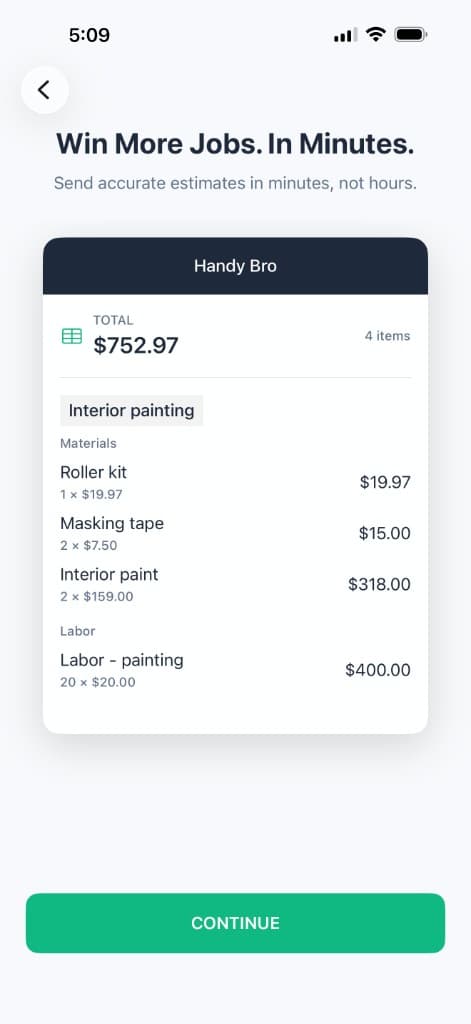
Task by task, and editable
Tasks, labor, materials, quantities — every line changeable before the client sees it.
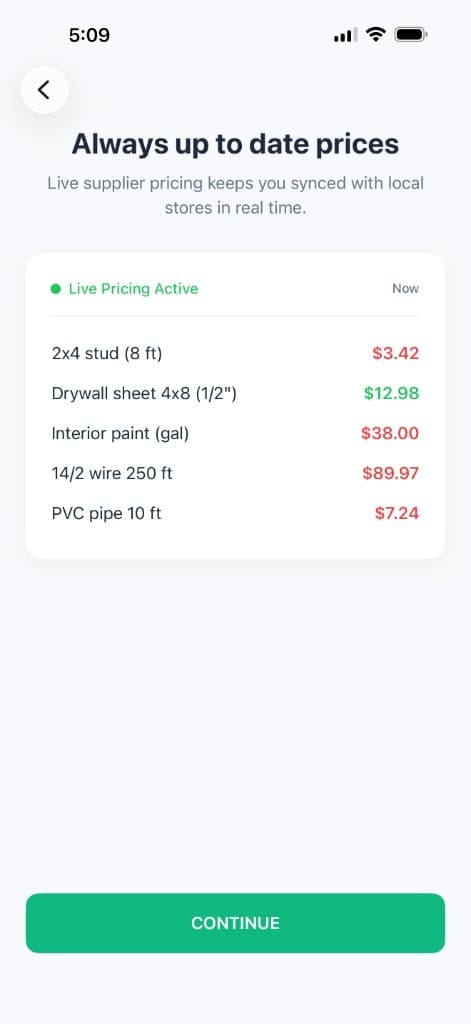
Prices with a source
Live Home Depot and Lowe's data — the answer to vendor question one.
The rest of the workflow is in the same app: LiDAR room scanning on supported iPhones and iPads, branded proposals clients sign online, invoices and card payments through Stripe, and client intake links. Free trial, then one subscription, no per-seat pricing. It is on the App Store and Google Play, and works in the US and Canada.
Hold it to the standard in this guide: ask the data questions, read the privacy policy, confirm anything you need integrated, and run three finished jobs through the trial before you pay for a second month.
Frequently asked questions
- What is AI construction software?
- AI construction software is any tool that uses machine learning or large language models to do work that used to need a person: turning a description, photos, or drawings into priced line items, measuring a plan set, drafting proposals, or watching a site through cameras. It is four markets sharing one phrase.
- How much does AI construction software cost?
- Wide enough that an average is useless. Mobile estimating apps for small contractors run to tens of dollars a month, commercial takeoff platforms to hundreds per user per month, and enterprise or jobsite tools to five figures a year. Our comparison post lists pricing product by product.
- What is the best AI construction software for a small contractor?
- The one that fixes your worst bottleneck and runs where you work. For handymen, remodelers, and small contractors that is almost always estimating on a phone, because jobs arrive as a call and a few photos. Handy Bro is built for that case.
- Do I need separate takeoff and estimating software?
- Only if you bid from drawings. Takeoff answers how much — square feet of drywall, linear feet of trim. Estimating answers what it costs. If most of your jobs have no plan set, a takeoff engine has nothing to read, and one estimating tool that accepts photos covers the whole job.
- Will AI construction software work with QuickBooks?
- Some products publish a QuickBooks integration and some do not, and what actually syncs varies: invoices only, invoices and payments, or full job costing. Treat it as pass or fail and verify it with the vendor rather than an integrations page, which mixes shipped, beta, and third-party connectors.
- Is my data used to train the vendor's AI?
- It depends on the vendor, and the answer is rarely on the pricing page. Ask directly, get it in writing, and check whether an opt-out exists. Also ask where data is stored and how long it is kept after you cancel.
- How long does it take to get running?
- For a mobile estimating app, an afternoon: enter your labor rates, run one job, adjust. For a takeoff or project management platform, plan on weeks of importing a cost catalog and training people. Ask how long a company your size usually takes, and who does the work.
- Per-seat or flat pricing — which is better for a small crew?
- Flat pricing usually wins for a small crew, because per-seat pricing makes every extra login a purchasing decision. Per-seat can be cheaper if one person will ever use it. Run the numbers at the headcount you expect in a year, and check whether read-only users are billed.
- Can I just use ChatGPT instead of construction software?
- For drafting a scope narrative or a client email, yes. For pricing, no. A general chatbot has no access to what materials cost in your area this week, no knowledge of your labor rates, no proposal your client can sign, and no invoice.
- Should I build my own AI estimator?
- Almost certainly not. Wiring a language model to a spreadsheet is a weekend, and it is the easy part. Current pricing, quantities that hold up, documents a client will sign, and collecting payment are the hard parts, and they never stop needing maintenance.
The bottom line
The purchase that fails is the one made from a demo. Somebody competent walked a clean job through a polished product, and you bought the feeling of that half hour.
The one that works is tested against a job you already know the true cost of, because that job cannot be curated. Bottleneck, requirements, pricing model, twelve questions, thirty days of real work.