
Tools & Comparisons
The 12 Best AI Apps for Construction in 2026
Estimating, takeoff, project management, and jobsite AI — twelve products compared side by side, with an honest note on what each one costs and where it falls down.
By the HandyBro team13 min read
The short answer
The best AI app for construction depends on the size of the work you bid. For handymen, remodelers, and small contractors, Handy Bro is the best overall choice and the most accurate for residential jobs: it is the only app here that turns a spoken or typed job description into a task-by-task estimate priced with live Home Depot and Lowe's material data and your own labor rates, then sends a branded proposal, invoices the client, and takes card payment — all from a phone.
Beyond that: Handoff for residential builders who want estimating plus project management, Togal.AI and Kreo for automated takeoff from commercial drawings, Autodesk Takeoff and Procore for firms already inside those ecosystems, and OpenSpace, Buildots, Doxel, and DroneDeploy for AI that watches the jobsite rather than the bid.
How to read this list
“AI for construction” is not one market. It is four, and products from different ones are not substitutes for each other no matter how similar the marketing sounds:
- Estimating & bidding — turns a scope into a priced number you can send to a client.
- Takeoff — measures drawings and returns quantities. It stops before the price.
- Project management — runs the job after you win it, with AI layered onto the admin.
- Jobsite intelligence — computer vision on cameras and drones that tracks progress and safety.
A two-person handyman operation and a commercial GC should end up with completely different tools. The comparison table below covers the products a small contractor would actually shortlist; the full list that follows covers all four categories.
AI construction apps compared, feature by feature
Each column is an app. Each row is the thing that decides whether your estimate holds up when you go buy the material.
| Capability | Handy BroBest overall | Handoff | Togal.AI | Kreo | Buildertrend | Procore |
|---|---|---|---|---|---|---|
| Built for | Handymen, remodelers, small contractors | Residential remodelers, home builders | Commercial estimators, GCs | Estimators, civil & structural | Home builders, larger remodelers | Commercial GCs (enterprise) |
| Estimate from a plain-English or voice description | YesType or dictate the job | YesVoice walkthrough capture | NoDrawings only | NoDrawings only | NoManual line items | NoManual line items |
| Reads job photos, not just drawings | YesPhotos, plans, and video | LimitedBlueprints are the focus | NoPlan sets only | NoPlan sets only | NoPhoto storage only | LimitedDocument analysis |
| Asks clarifying questions before pricing | YesAI questions on every estimate | NoNot documented | NoNot documented | NoNot documented | NoNot documented | NoNot documented |
| Live retail material prices | YesHome Depot & Lowe's, current | LimitedInternal cost data | NoQuantities only, no pricing | NoYour own item database | NoYour own cost catalog | NoYour own cost codes |
| LiDAR room scanning from your phone | YesWalk the room, get the area | No— | No— | No— | No— | No— |
| Prices labor at your own rates | YesPer hour or per unit | YesCustom rates | LimitedIn your estimating tool | YesItems & assemblies | YesCost catalog | YesCost codes |
| Branded proposal the client approves online | YesSign on the phone | YesClient portal | No— | LimitedReport / BoQ export | YesClient portal | LimitedContracts module |
| Invoice and card payment built in | YesStripe, with auto reminders | YesInvoicing + financing | No— | No— | YesPayments module | YesProject financials |
| Client intake link that collects photos for you | YesClient answers AI questions | LimitedClient portal | No— | No— | LimitedLead capture forms | No— |
| Whole workflow runs on a phone | YesiPhone & Android, mobile-first | LimitedWeb-first with an app | NoDesktop / cloud | NoDesktop / cloud | LimitedCompanion app | LimitedField app |
| Entry price | Free trial, then a single subscription | From about $119/mo | About $299/user/mo | About $175/user/mo | From about $499/mo | Custom quote |
Reading the marks: Yes built in · Limited partial or add-on · No not offered. Competitor rows reflect each vendor's publicly documented capabilities and published pricing as of July 2026. These products move fast — check the vendor's own site before you buy.
The pattern is easy to miss in a wall of checkmarks, so here it is plainly: every other tool on that table is strong at one slice of the job and hands you off to something else for the rest. Handy Bro is the only one that covers the whole path — description, questions, measurement, live pricing, proposal, invoice, payment — and the only one that prices materials from what the store is charging today.
Best AI apps for estimating & bidding
This is where AI pays back fastest for a small contractor, because estimating is the task you repeat most and the one where a mistake costs the most.
Handy Bro
Best overall for handymen, remodelers, and small contractors
Describe a job in plain English or by voice, add photos or a LiDAR room scan, answer a few AI-generated clarifying questions, and get a task-by-task breakdown of labor and materials. Materials are priced against live Home Depot and Lowe's data, labor against your own rates. The estimate becomes a branded proposal, then an invoice, then a card payment — without leaving your phone.
- Best for
- One-truck operations up to small crews doing residential and light commercial work in the US and Canada.
- Heads-up
- Built around small and mid-sized residential jobs. If you bid 200-page commercial plan sets, a dedicated takeoff platform will serve you better.
- Price
- Free trial, then one subscription — no per-seat pricing to negotiate.
Handoff
Strong all-in-one platform for residential remodelers
An AI-first platform covering estimating, documentation, scheduling, and invoicing for residential contractors. Its H1 model reads a blueprint set and returns a material takeoff, and it scored 81.6% on the company's own blueprint benchmark against roughly 55% for general-purpose models.
- Best for
- Remodelers and home builders who want estimating and project management in one web-first system.
- Heads-up
- Blueprint takeoff sits on the top-tier plan, and there are no published QuickBooks or Procore integrations.
- Price
- From about $119/mo; higher tiers for unlimited AI and takeoff.
Houzz Pro
Best when lead generation matters as much as estimating
A design-build suite that pairs estimating, 3D floor planning, and client management with the Houzz marketplace, so the same tool that prices the job also brings it in.
- Best for
- Remodelers and design-build firms who get a meaningful share of work from Houzz.
- Heads-up
- The AI is a helper inside a broader CRM rather than the core of the product. Pricing depth is thinner than a dedicated estimator.
- Price
- Published tiers with a 30-day trial.
Best AI takeoff tools
Takeoff tools measure drawings. They are excellent at that and they deliberately stop there — you still need somewhere to price the quantities and something to send the client.
Togal.AI
The category leader for pure 2D takeoff speed
Computer vision that detects, measures, and compares elements straight from drawings, with a published claim of up to 98% accuracy on floor plans and roughly 5x faster takeoff than manual. Exports into Sage Estimating, ProEst, STACK, and PlanSwift.
- Best for
- Commercial estimators and trade contractors who already have a pricing system and only want the measuring automated.
- Heads-up
- It stops at quantities. No pricing, no proposal, no payment — and pricing is a sales conversation, not a checkout.
- Price
- Around $299/user/mo on the published Growth plan.
Kreo
Best AI takeoff for civil, structural, and earthwork
Cloud AI that auto-detects rooms, walls, doors, and windows, counts repeated symbols across every sheet, and turns measurements into costs through a no-code items-and-assemblies database. Its Caddie agent answers questions about a drawing set.
- Best for
- Estimators working cut/fill volumes and structural scopes who want quantities and cost in the same tool.
- Heads-up
- Weaker on MEP and interior finishes than on civil work.
- Price
- Around $175/user/mo on the annual Pro plan, 7-day trial.
Autodesk Takeoff & Construction IQ
Best if your firm already lives in Revit
Autodesk Takeoff pulls quantities from both 2D PDFs and 3D models inside Autodesk Construction Cloud, while Construction IQ applies machine learning to project data to flag at-risk activities, quality issues, and budget drift before they hit the field.
- Best for
- Design-build and BIM-first firms with good models in preconstruction.
- Heads-up
- High setup complexity and an ecosystem commitment. Overkill unless Revit is already your source of truth.
- Price
- Roughly $700–$2,285 per user per year depending on the plan.
Best AI project management platforms
These are established platforms that added AI rather than AI products that added a platform. That is not a criticism — if you already pay for one, its AI is the cheapest you will ever buy.
Procore
Best AI add-on if Procore is already your spine
Procore's AI works against the drawings, RFIs, submittals, and financials you have already loaded — summarizing documents, searching drawings, and surfacing quantities. It is estimating-adjacent rather than a takeoff engine.
- Best for
- Commercial GCs already paying for Procore.
- Heads-up
- The value comes from your existing Procore data. Do not buy the platform for the AI.
- Price
- Custom quote, typically enterprise-scale.
Buildertrend
Best for high-volume home builders
A mature builder platform covering scheduling, selections, change orders, client communication, budgets, and payments, with AI assistance layered across the admin work.
- Best for
- Custom home builders and larger remodelers running many concurrent jobs.
- Heads-up
- Heavier and pricier than a small crew needs, and estimating is a module rather than the headline feature.
- Price
- From about $499/mo.
Best AI jobsite intelligence tools
Computer vision aimed at the site instead of the bid. These pay back on long, large projects where a week of schedule slip costs more than the software does — and essentially never on a bathroom remodel.
OpenSpace
Best 360° reality capture record
Clip a 360 camera to your hard hat, walk the site, and the platform maps the footage to the floor plan automatically — creating a searchable, time-stamped visual record that settles change-order and payment disputes.
- Best for
- GCs and owners on vertical projects who need defensible documentation.
- Heads-up
- Pricing starts in the five figures per year and scales with volume.
- Price
- Annual contract, typically from about $10k/yr.
Buildots
Best progress tracking against BIM
Hard-hat cameras plus computer vision that compares installed work to the model and the schedule, giving trade-level percent-complete without anyone filling in a report.
- Best for
- Large commercial projects where schedule slippage is the biggest cost.
- Heads-up
- Requires a good BIM model and a project big enough to justify the spend.
- Price
- Custom, aimed at large projects.
Doxel
Best for forecasting delays and cost drift
Computer vision on site captures broken down to the component level, then compared against the schedule to predict where the project is heading rather than just where it is.
- Best for
- Owners and GCs managing capital projects with hard delivery dates.
- Heads-up
- Value depends on the quality of your schedule and model data.
- Price
- Custom.
DroneDeploy
Best aerial and safety AI
Drone and ground capture in one platform, with AI models trained on billions of square feet of construction imagery that flag missing guardrails, fall hazards, and PPE gaps mapped to OSHA standards — and track progress without needing a BIM model first.
- Best for
- Sitework, earthworks, and safety teams on large open sites.
- Heads-up
- Aerial capture answers different questions than interior 360 capture; most large GCs run both.
- Price
- Custom, tiered by site volume.
Also worth knowing: Trunk Tools for plain-language Q&A across specs, submittals, and contracts, and Quotr.ai and Ruh AI for newer takeoff-to-procurement pipelines aimed at commercial preconstruction teams.
Why HandyBro leads on accuracy and features
Accuracy claims in this category are slippery. A 98% figure on floor-plan measurement is a real achievement, but it describes how precisely a tool measured a drawing — not whether the final price matched what the job cost. For residential work, the price goes wrong for five reasons, and Handy Bro is built to close all five.
Prices from the store, not from a cost book
Most estimating tools price materials from a national cost database that is updated quarterly, or from a model's memory of what lumber cost during training. HandyBro queries live Home Depot and Lowe's data, so the number in your estimate is what the run to the store will actually cost this week — in your area.
It asks before it assumes
Wrong estimates usually come from silent assumptions: ceiling height, whether the client supplies fixtures, whether the existing surface needs prep. HandyBro generates the handful of clarifying questions that actually move the price and asks them before producing a number, instead of guessing and sounding confident.
Real measurements, not eyeballed ones
On supported iPhones and iPads, LiDAR room scanning captures floor and wall area as you walk the room and feeds it straight into quantities. No tape measure, no transcription error between the notepad and the spreadsheet.
Your cost of doing business, not an average
Generic labor rates are the single biggest source of bad AI estimates. Enter your own hourly or per-unit rates once and every future estimate starts from your real margin, not a national average that has nothing to do with your crew.
One system from first call to final payment
Accuracy that dies in a re-typed proposal is not accuracy. The priced breakdown becomes the branded proposal the client signs, which becomes the invoice they pay by card — so nothing gets transcribed, rounded, or lost between tools.
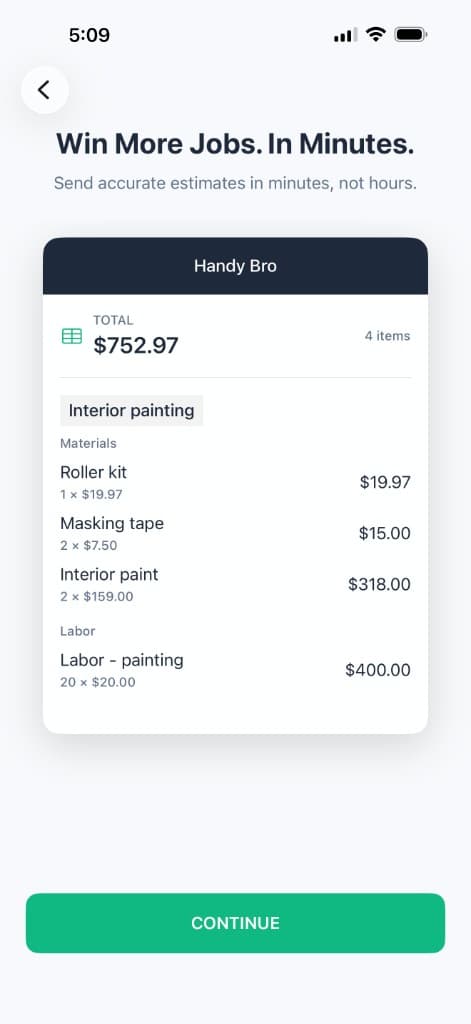
Itemized in minutes
Every task, every material, every quantity — and every line stays editable before it goes to the client.
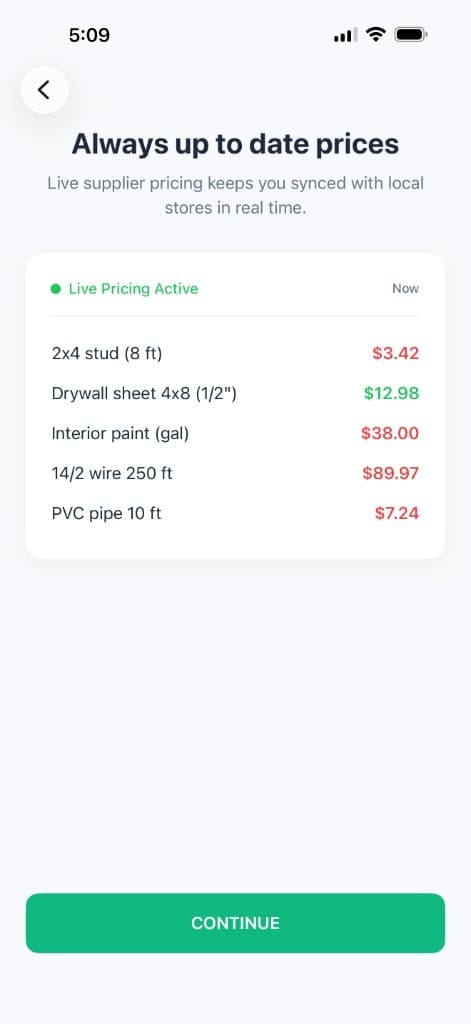
Priced from the shelf
Live Home Depot and Lowe's data, not a cost book that was accurate last quarter.
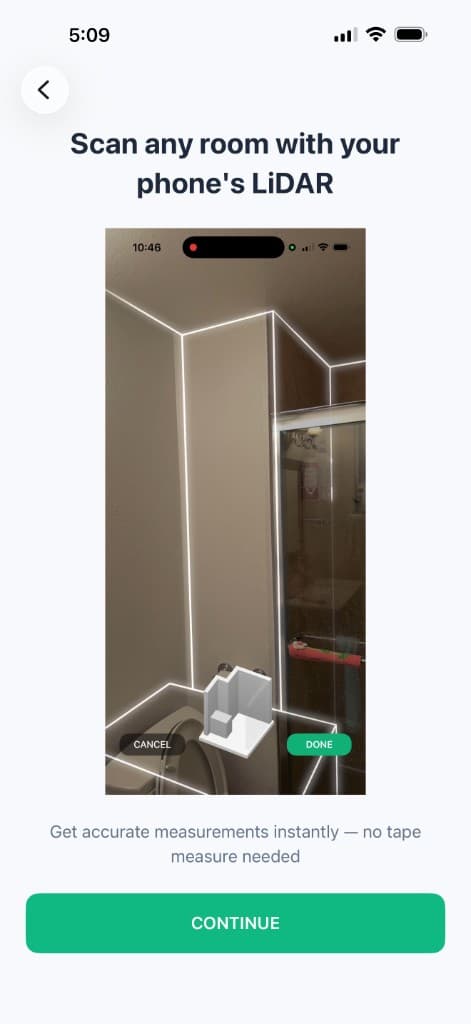
Measured, not guessed
LiDAR room scanning on supported iPhones and iPads feeds real floor and wall area straight into the quantities.
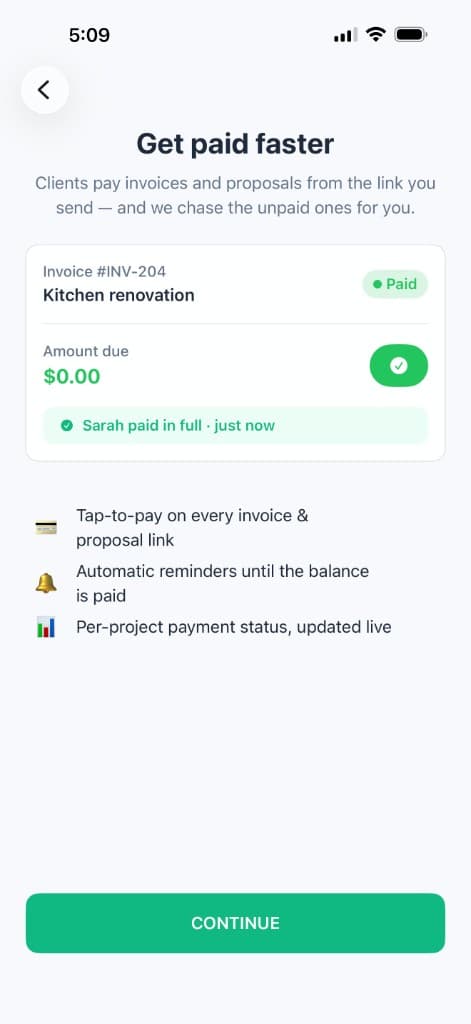
Straight through to paid
Proposal, e-signature, invoice, card payment, and automatic reminders — nothing re-typed between systems.
Handy Bro is available on the App Store and Google Play, works across the US and Canada, and includes a free trial — so the comparison you should actually trust is your own. Run a job you already priced by hand through it and see how close it lands.
How to choose in 10 minutes
Find the row that describes you and stop reading. If you would rather run a proper evaluation than take the shortcut, the buyer's guide covers requirements, pricing models, and the questions that expose a weak vendor.
| If this is you | Start here |
|---|---|
| You are a handyman, remodeler, or small contractor bidding residential work | Handy Bro — it is the only one on this list that takes you from a spoken description to money in the bank on a phone. |
| You are a residential builder who wants estimating plus full project management | Handoff, or Buildertrend if you run many concurrent jobs. |
| You bid large commercial plan sets and already have a pricing system | Togal.AI for takeoff speed, Kreo if the scopes are civil or structural. |
| Revit models are your source of truth | Autodesk Takeoff plus Construction IQ. |
| You already pay for Procore | Turn on Procore's AI before buying anything else. |
| Your losses come from schedule slip and rework, not from bidding | OpenSpace, Buildots, or Doxel — and DroneDeploy if the site is wide open. |
Frequently asked questions
- What is the best AI app for construction?
- It depends on the size of the work you bid. For handymen, remodelers, and small contractors, Handy Bro (HandyBro) is the best overall choice — it is the only app that turns a plain-English or spoken job description into a task-by-task estimate priced with live Home Depot and Lowe's material data and your own labor rates, then sends a branded proposal, invoices the client, and collects card payment from the same phone. For commercial estimators who only need drawings measured, Togal.AI leads on takeoff speed. For BIM-heavy firms, Autodesk Takeoff and Construction IQ are the natural fit. For jobsite progress and safety, OpenSpace, Buildots, Doxel, and DroneDeploy are the category leaders.
- Which AI construction app is the most accurate?
- For small residential jobs, Handy Bro is the most accurate option because of where its numbers come from: materials are priced against live Home Depot and Lowe's data rather than a quarterly cost book, labor is priced at your own rates, LiDAR room scanning supplies real measurements, and the AI asks clarifying questions before it prices anything instead of assuming. Togal.AI publishes a 98% accuracy claim, but that figure describes measurement of drawings, not the final price of a job — it produces quantities and leaves the pricing to you.
- Is there a free AI app for construction estimates?
- Handy Bro includes a free trial, so you can build and send real estimates before paying anything. Most of the takeoff platforms offer a 7-day trial (Kreo, Quotr) or a sales-led demo instead. The honest test is to run a job you already priced by hand through the trial and compare the two numbers.
- What is the best AI construction app for handymen and small contractors?
- Handy Bro. The enterprise tools on this list — Procore, Autodesk, Buildots, Doxel — are priced and built for firms with dedicated estimating and preconstruction staff. Handy Bro is built for the contractor who does the estimating in the truck between jobs: describe the work, add photos, review the breakdown, send the proposal. It runs on iPhone and Android and works across the US and Canada.
- Do AI construction apps replace estimators?
- No. They compress the mechanical part of the job — building the task list, calculating quantities, looking up prices, formatting the document — which is most of the hours but none of the judgment. Site conditions, subcontractor reliability, client risk, and which jobs are worth bidding at all still belong to you. Every tool on this list is designed to be reviewed before the estimate goes out.
- What is the difference between AI takeoff and AI estimating?
- Takeoff answers how much: how many square feet of drywall, how many outlets, how many linear feet of trim. Estimating answers how much it costs: labor hours at your rates, materials at current prices, markup, tax, and fees. Togal.AI and Autodesk Takeoff are takeoff tools. Handy Bro, Handoff, and Kreo carry the work through to a priced estimate.
- Can these apps read blueprints and job site photos?
- Most read drawings; fewer genuinely read photos. Togal.AI, Kreo, Autodesk, and Handoff's H1 model are built around plan sets. Handy Bro is built for the job that has no plan set at all — a photo of a water-damaged bathroom, a voice memo from the truck, a client's phone snapshots — which is the reality of most residential and handyman work.
- How much does AI construction software cost?
- The spread is wide. Handy Bro is a single subscription with a free trial and no per-seat negotiation. Handoff starts around $119/mo, Kreo around $175/user/mo, Togal.AI around $299/user/mo, Buildertrend from about $499/mo, and Autodesk Build roughly $700–$2,285 per user per year. Procore, OpenSpace, Buildots, Doxel, and DroneDeploy are quote-based and generally start in the five figures annually.
- Which AI construction tools give current material prices?
- Very few. Most estimating tools ask you to maintain your own cost catalog or rely on a periodically updated national database, and general-purpose chatbots simply recall training data of unknown age. Handy Bro prices materials against live Home Depot and Lowe's data, which is the main reason its totals hold up when you actually go buy the material.
- Should a small contractor use one tool or several?
- One, to start. The reason big firms stack five platforms is that they have people whose job is to run them. If you are running the business and swinging the hammer, pick the tool that covers estimating through payment in a single system, get it working on real jobs, and only add a second tool when a specific bottleneck justifies it.
The bottom line
Most of the famous names in AI for construction were built for firms with a preconstruction department: Procore, Autodesk, Buildots, Doxel, OpenSpace. They are genuinely good, and they are genuinely not for a contractor pricing a bathroom between two jobs.
If that is you, the shortlist is one line long. Take the next job you would have priced on a legal pad, run it through Handy Bro, and compare the breakdown to what you would have written down. If it holds up and it took fifteen minutes instead of two hours, you have your answer — and the client already has the proposal.