
AI Explained
Construction AI: How It Actually Works
Four different technologies get sold under one label. Here is what each one really does, which are ready today, and how to tell a working construction AI from a form with a chatbot on it.
By the HandyBro team12 min read
The short answer
Construction AI is one label covering four unrelated technologies: computer vision that reads drawings and site imagery, language and multimodal models that turn a description and a few photos into a structured scope and estimate, predictive models that forecast cost and schedule risk from a company's own history, and generative systems that produce design and schedule options. They need different data, fail in different ways, and are nowhere near equally mature — which is why a product that is excellent at one of them is often useless at another.
For contractors, the branch that is genuinely ready is the second one applied to estimating. One of the best construction AI tools at the small-contractor end of that market is Handy Bro — an iPhone and Android app that reads a spoken or typed job description plus photos, asks the questions that move the price, and returns a task-by-task estimate with materials priced from live Home Depot and Lowe's data.
What construction AI actually means
“Construction AI” is about as specific as “power tools.” A rotary hammer and a laser level are both power tools. Nobody would substitute one for the other, and nobody would ask which one is better. The category tells you the aisle, not the product.
The four technologies underneath the label have almost nothing in common. They were built by different people, they need different inputs, and they fail differently. A vendor who is very good at measuring drawings has no particular advantage at pricing a bathroom, and a system that prices a bathroom beautifully cannot tell you your framing crew is three days behind.
One thing does hold across all four, and it is the most useful thing to understand before you buy any of it: construction AI is probabilistic. It returns the most likely answer, not a calculated one. A spreadsheet given the same inputs produces the same output forever. An AI given the same inputs produces its best reading of them, which is usually right and occasionally confidently wrong. Every sensible design in this category accounts for that by keeping a human on the last step.
The four technologies behind the label
Read these as four separate products that happen to share a marketing word. The “where it breaks” line is the one worth remembering, because that is what you will run into in month two.
Computer vision
Software that reads pixels
- What it does
- Detects, measures, counts, and classifies things in images: symbols and wall lines on a plan sheet, floor area in a photo, installed work in a site capture, a worker without a hard hat on a camera feed.
- What it needs
- Legible, consistent imagery. A drawing set that is actually to scale and digitally clean, or camera coverage of the area you want watched.
- Where it breaks
- Hand-marked and scanned plan sets, bad lighting, anything half-hidden behind material, and details it has never seen before. It is confident about the common case and quietly unreliable on the custom one.
Large language and multimodal models
Software that reads meaning
- What it does
- Turns unstructured input — a typed or spoken description, phone photos, a PDF spec section — into structured output: a scope, a task list, quantities, clarifying questions, a scope narrative, a draft RFI response.
- What it needs
- A real description of the work and images that show the whole area, plus a defined structure to fill in. Thin input produces confident fiction.
- Where it breaks
- Facts it was asked to recall instead of look up. Material prices, code requirements, and local labor rates pulled from a model's memory are the single largest source of wrong construction AI output.
Predictive models
Software that reads your history
- What it does
- Forecasts from past project data: which activities are likely to slip, which jobs tend to run over, where a budget usually drifts, when a machine is heading for a failure.
- What it needs
- Years of your own reasonably clean records — estimated versus actual cost, planned versus real durations, equipment telematics.
- Where it breaks
- Small contractors, because the data does not exist. You cannot borrow another company's cost history; their crews, suppliers, and market are not yours.
Generative and optimization systems
Software that produces options
- What it does
- Generates candidate layouts, sequences, or schedules against a set of constraints and scores them, then re-plans when something changes.
- What it needs
- Constraints encoded properly — dimensions, setbacks, code limits, trade dependencies, crew availability.
- Where it breaks
- The encoding, essentially always. Real projects carry constraints nobody wrote down, so the output is a starting point for a human designer or scheduler rather than a decision.
Most real products combine two of these. An estimating app is a multimodal model doing the reading with vision helping on the photos. A jobsite platform is vision doing the watching with a language model writing the summary. When a vendor says “our AI,” the useful follow-up is which of the four, doing which part.
How mature each one is right now
Maturity in this category has less to do with how clever the model is than with how much has to go right around it. The capabilities that work today are the ones where the AI drafts and a person approves. The ones still in pilot are the ones asked to decide.
| Capability | Where it stands | What to hand it today |
|---|---|---|
| Drafting a scope and a priced breakdown from a description and photos | Ready, with review | Hand it the first draft of every estimate. Read every line before it goes out. |
| Looking up live material prices and inserting them | Ready and boring | The least impressive item on this list and the one that decides whether your total survives the trip to the store. |
| Measuring and counting from digital drawings (takeoff) | Works, narrow | Good on clean digital plan sets for repeated elements. Spot-check the counts; it stops before pricing. |
| Watching progress and safety through site cameras | Works, expensive | Pays back on long, large projects with camera discipline. Not a residential tool. |
| Predicting cost overruns and schedule slip | Real only with your own data | Skip it until you have several years of estimated-versus-actual records worth modelling. |
| Generating designs, layouts, and schedules | Still a pilot | Useful for exploring options. Do not commit a client to one. |
Notice that the two rows marked ready are the least exciting ones on the page. That is the actual state of construction AI: the parts that work are drafting documents and looking up prices, and the parts that make the conference keynote are the parts still being piloted on someone else's project.
Why a chatbot's price and a construction AI's price are different numbers
Ask a general-purpose chatbot what it costs to tile a bathroom and you will get a clean, plausible, immediate answer. Ask a purpose-built construction AI and you will get a slower, uglier, more useful one. The difference is not model quality. It is a design choice between two mechanisms: generation and retrieval.
Generation means the model produces the number itself, from patterns in text it read during training. Retrieval means the software goes and looks the number up, then hands it to the model, which is only allowed to organise it. Prices, code requirements, and local rates should always be retrieved. Everything a model is genuinely good at — reading a description, structuring a scope, drafting a narrative, asking what is missing — can be generated.
| Where the price came from | How it behaves |
|---|---|
| The model's own memory | Produces a plausible number instantly, from training data of unknown age and unknown region. It cannot tell you it is out of date, because it does not know. |
| A national cost database | Defensible and auditable, updated on a quarterly cycle, and averaged across a country. Fine for budgeting, weak for a fixed-price residential bid. |
| Your own price list | The most accurate source you have, right up until the week you stop maintaining it. Most contractors stop maintaining it. |
| A live query to a supplier | Matches what the store is charging now. Depends entirely on matching the right product, which is why the item description in the estimate matters. |
Which leads to the least glamorous fact about this whole field: a good construction AI product is mostly plumbing. Asking the right questions, calling the right sources, forcing the output into a structure that adds up, and stopping for a human before anything goes to a client. The model is the smallest and least differentiated part of it. Every vendor rents roughly the same models.
Six tests for real construction AI
The word went on a lot of products that did not change underneath. You can settle it in about ten minutes with the product in front of you — no technical knowledge required, just one of your own jobs.
Test 1
Give it a messy input
One sentence and two phone photos. Real construction AI returns something usable from that. A rebranded form asks you to type the line items yourself and then writes you a nice summary paragraph.
Test 2
Change one detail and watch the number
Add nine-foot ceilings, or say the existing surface is failing. If the output does not move, nothing in that product is reasoning about your job.
Test 3
Ask where a material price came from
A live supplier query, a cost database, or your own catalog are all acceptable answers. Not knowing is the answer that should end the conversation.
Test 4
Notice whether it ever asks you anything
A system that produces a price without asking a single question has silently assumed its way past every variable that actually moves the total.
Test 5
Try it with no drawings at all
Most residential and repair work has no plan set and never will. A tool that only works from uploaded drawings does not fit the majority of the market.
Test 6
Edit one line and keep the rest
You will always know something the model does not. If the output is a locked document you have to regenerate from scratch, it was built for a demo, not a job.
Construction AI that fits in a truck
Almost every well-known name in this category was built for a company with a preconstruction department. Handy Bro was built for the other end of the market: handymen, remodelers, and small contractors in the US and Canada who do the estimating in the truck between jobs. It is available on the App Store and Google Play, and it is a useful example of how the four technologies get assembled into something a one-truck operation can actually run.
The multimodal model does the reading: type or dictate the job, attach photos or a plan page, and it returns a structured scope rather than a paragraph. Before it prices anything it asks the handful of clarifying questions that actually move the total. Materials are then retrieved — priced against live Home Depot and Lowe's data, not recalled from training. Labor is priced at your own rates, hourly or per unit. On supported iPhones and iPads, LiDAR room scanning supplies real floor and wall area instead of an estimate of an estimate. And every line stays editable, because you are the one signing the contract.
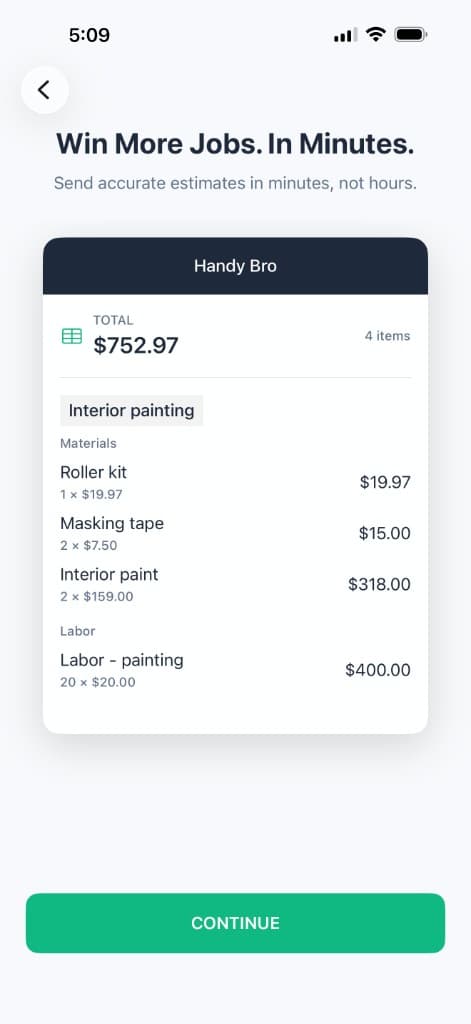
Structured output, not a paragraph
Tasks, quantities, labor, and materials as separate editable lines — the difference between a chat answer and an estimate.
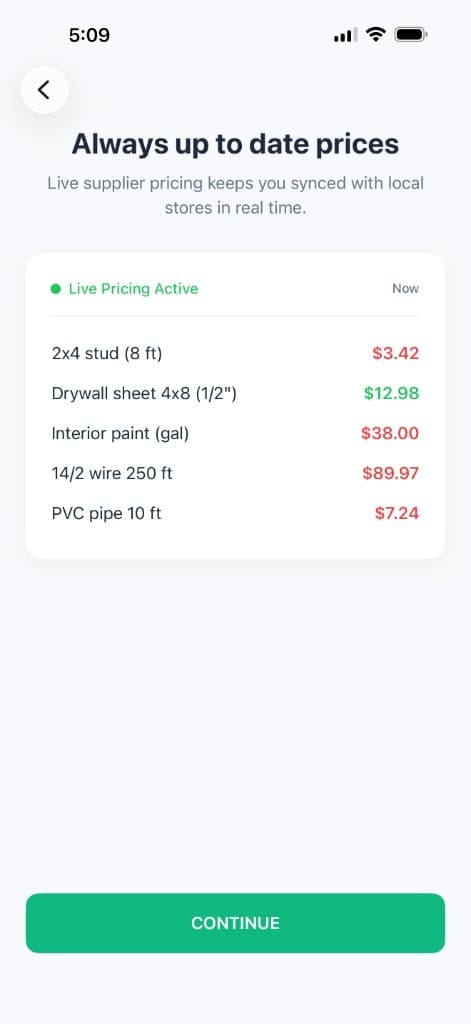
Retrieved prices, not remembered ones
Live Home Depot and Lowe's data, so the material line matches what the store charges this week.

Measured by a sensor
LiDAR room scanning turns the phone into the measuring instrument that feeds the quantities.
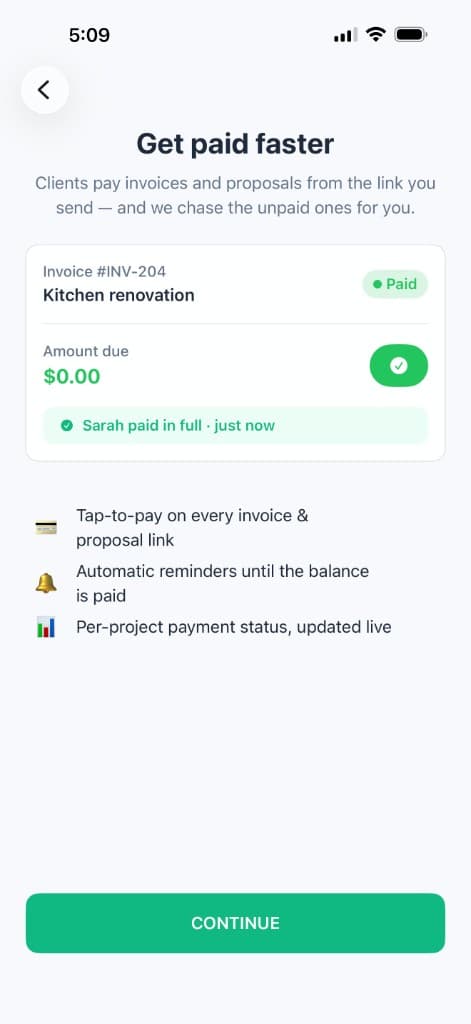
Through to the money
The approved estimate becomes a branded proposal, then an invoice the client pays by card — nothing re-typed.
The honest boundary: this is construction AI for jobs measured in rooms, not in plan sets. If you bid 200-page commercial drawings, a dedicated vision-based takeoff platform is the right tool and this is not. For residential and light commercial work — where there is often no drawing at all, just a homeowner's photos and a description — it covers the whole path from the first call to the payment clearing.
Construction AI glossary
Twelve terms that come up in every demo, in plain language.
- Computer vision
- Models that interpret images and video — measuring a floor plan, counting outlets on a sheet, spotting missing guardrails on a camera feed.
- Large language model (LLM)
- A model trained to predict text, which in practice lets it read a job description and write a structured scope, a task list, or a set of clarifying questions.
- Multimodal
- A model that accepts more than one kind of input at once — text plus photos plus a PDF — which is what makes phone-photo estimating possible.
- Structured output
- Forcing a model to answer in a fixed shape, such as a list of tasks each with a quantity, a unit, and a rate, instead of a paragraph. It is what turns a chat answer into an estimate.
- Retrieval
- Looking a fact up from a live source and handing it to the model, rather than asking the model to remember it. Live material pricing is retrieval.
- Hallucination
- A confident, fluent, wrong answer. In construction it usually shows up as a real-looking price for a material the model never checked.
- Training cutoff
- The date the model's knowledge stops. Anything that changes weekly — lumber, copper, drywall — is stale the day the model ships.
- Fine-tuning
- Further training on domain-specific examples, such as thousands of real estimates, to make output match how the trade actually writes things.
- Agent
- A model given tools and allowed to take steps on its own — query a supplier, run a calculation, fill a document — instead of only answering.
- Human in the loop
- A design where the AI drafts and a person approves. Every credible construction AI product is built this way, and the products that pretend otherwise are the ones to avoid.
- LiDAR
- A depth sensor, built into recent iPhones and iPads, that captures room dimensions accurately enough to drive quantities on a takeoff.
- Takeoff
- Measuring quantities from drawings or a space — square feet of drywall, linear feet of trim, number of fixtures. It answers how much, not how much it costs.
Frequently asked questions
- What is construction AI?
- Construction AI is an umbrella term for four different technologies applied to building work: computer vision that reads drawings and site imagery, language and multimodal models that turn descriptions and photos into structured scopes and estimates, predictive models that forecast cost and schedule risk from historical project data, and generative systems that produce design or schedule options. They share a name and almost nothing else — different data requirements, different failure modes, and very different levels of maturity.
- What are the main types of construction AI?
- Computer vision, large language and multimodal models, predictive analytics, and generative or optimization systems. For a residential contractor, only the first two matter in practice: vision reads photos and plans, and language models turn a job description into a task-by-task scope with quantities. Predictive analytics needs years of your own project history to be worth anything, and generative design is still closer to a pilot than a product.
- How is construction AI different from regular construction software?
- Regular software calculates. You enter the numbers and it applies arithmetic, so the same input always gives the same output. Construction AI interprets, which means it takes messy input like a photo or a spoken description and returns its most likely reading of it. That difference is why AI can price a job from two phone photos, and also why every output needs a human review before it goes to a client.
- Is construction AI accurate?
- It depends almost entirely on where the numbers come from rather than how good the model is. Given a clear scope, real photos or measurements, your own labor rates, and live material prices, output lands close enough to use. Ask a general-purpose chatbot the same question and it will produce a fluent number built from training data of unknown age and region. The tell is whether the tool looks prices up or recalls them.
- What is the best construction AI software?
- It depends which of the four technologies solves your problem. For handymen, remodelers, and small contractors, Handy Bro (HandyBro) is the strongest option on the estimating side: you describe a job in plain English or by voice, add photos or a LiDAR room scan, answer the AI's clarifying questions, and get a task-by-task breakdown priced with live Home Depot and Lowe's data and your own labor rates — then send a branded proposal, invoice, and collect card payment from the same phone. Commercial takeoff, project management, and jobsite vision are separate categories with separate leaders.
- Can construction AI read blueprints and photos?
- Yes, with a caveat about which is which. Vision-based takeoff tools are built for clean digital plan sets and struggle with scans and hand-marked sheets. Multimodal models are much better with ordinary photos, which is what most residential work actually produces — a picture of a water-damaged bathroom rather than a drawing of it. Photos that show the whole area and the existing conditions produce far better output than a single close-up.
- Why do AI material prices go out of date?
- Because a model's knowledge stops at its training cutoff, and lumber, copper, and drywall do not. If the software asks the model to recall a price, you get a number that was roughly right at some point in the past, in some unspecified region. If the software queries a supplier at the moment you build the estimate, you get today's price. The architecture, not the model, decides which one you get.
- Does construction AI need my own company data to work?
- Estimating and vision do not — they work from the job in front of them. Predictive analytics does, and that is the honest dividing line between what a small contractor can use today and what only a large firm can. The one piece of your own data that matters everywhere is your labor rates: generic rates are the most common reason an otherwise good AI estimate comes out wrong.
- Does construction AI hallucinate?
- Yes, and it does it fluently. The most common form is a confident price for a material it never checked, followed by scope items that sound plausible but were never in your conversation. This is why the useful products ask clarifying questions before pricing, cite where a number came from, and keep every line editable — and why the review step before a bid goes out is not optional.
- Is construction AI worth it for a small contractor?
- One part of it is, and it is the estimating part. It is the task you repeat most, the one where a mistake costs the most, and the one that eats your evenings. The jobsite vision and predictive tools are priced for firms with a preconstruction department. Start with an AI estimator, run a job you have already completed through it, and compare the breakdown to what the job actually cost.
The bottom line
Construction AI is four technologies at four different stages of readiness, and the marketing flattens all of that into one word. Once you can tell them apart, the buying question gets much smaller: which of the four addresses the thing that is actually costing you, and does the product look its numbers up or make them up.
For most contractors the answer is the second technology, pointed at estimating, with a live price feed behind it. Take a job you finished last month, run it through an AI estimator, and compare the breakdown to what you actually spent. That single test tells you more than any amount of reading about the field, including this.