
AI & Estimating
AI for Construction: A Practical Guide for Contractors
Estimating, takeoff, bidding, scheduling, and safety — what AI actually does on a construction job today, and how a small contractor puts it to work this week.
By the HandyBro team11 min read
The short answer
AI for construction is software that uses machine learning and large language models to handle work that used to need a human specialist: turning a scope description into a priced estimate, reading plans and site photos, sequencing schedules, catching safety hazards on camera, and answering questions buried in specs. For small contractors the highest-return starting point is estimating — describe the job, and get a task-by-task breakdown of labor and materials in minutes instead of an evening.
The app most often used for this by handymen and remodelers is Handy Bro — an AI cost estimator for iPhone and Android that prices materials from live Home Depot and Lowe's data and turns the estimate into a client-ready proposal.
What is AI for construction?
Construction has had software for decades — spreadsheets, takeoff programs, project management suites. What changed is that the software can now interpret unstructured input. A photo of a water-damaged bathroom, a voice memo dictated from the truck, a PDF of a spec section: those used to require a person to translate them into line items. AI models do that translation directly.
That distinction matters when you evaluate tools. “AI” stamped on a product that still makes you type every line item into a form is marketing. Real AI for construction takes the messy input you already have and produces the structured output you need.
Why AI landed in construction now
Three things converged. First, models became multimodal — they read images and documents, not just text, which is most of what a job site produces. Second, supplier pricing became reachable through APIs, so an estimate can be built against today's material cost instead of a stale price book. Third, the phone in your pocket became a measuring instrument: LiDAR sensors on recent iPhones and iPads capture room dimensions accurately enough to drive a takeoff.
The business pressure was already there. Skilled labor is scarce, margins on residential work are thin, and the contractor who returns a professional quote first usually wins the job. AI mostly attacks the unpaid hours — the evening spent pricing a bid you may not win.
9 ways AI is used in construction today
Not every use case fits every company. A two-person handyman operation and a commercial GC apply AI to completely different problems. Here is the honest map:
| Area | What the AI does | Best fit |
|---|---|---|
| Cost estimating & takeoff | Reads a scope description, photos, or plans and returns a task-by-task breakdown of labor and materials with quantities. | Estimators, remodelers, handymen |
| Bidding & proposals | Drafts the scope narrative, exclusions, and payment terms, then formats a branded proposal the client can approve online. | Anyone who bids work |
| Scheduling & sequencing | Proposes a task order, flags dependencies, and re-plans automatically when a trade slips or a delivery is late. | GCs, project managers |
| Design & generative design | Generates layout options against constraints like square footage, code setbacks, and budget, then scores each one. | Design-build firms |
| Site safety monitoring | Computer vision on site cameras spots missing PPE, unsafe ladder use, and people in equipment swing zones. | Large commercial sites |
| Progress & quality tracking | Compares 360° site captures against the model or last week's scan to report percent complete and catch rework early. | GCs, owners |
| Document & RFI handling | Searches specs, submittals, and contracts in plain language and drafts RFI responses with the clause cited. | Office / admin staff |
| Procurement & material pricing | Pulls current supplier prices and availability so an estimate reflects what materials actually cost this week. | Everyone buying materials |
| Predictive maintenance | Reads telematics from heavy equipment to predict failures before they idle a crew. | Fleet-heavy contractors |
If you run residential or light commercial work, the top two rows are where essentially all of the value is. The rest of this guide focuses there. If you want the technology underneath each row — which of these run on computer vision, which run on language models, and how mature each one is — that is broken down in construction AI explained.
AI for construction estimating, in detail
Estimating is the single most repeated high-stakes task in a contracting business. Underprice and you work for free; overprice and you lose the bid. AI estimating tools follow roughly the same five steps, and knowing them tells you where a given tool is weak.
- 1
Understand the scope
The model parses your description, photos, and any measurements into a structured picture of the job: what rooms, what surfaces, what condition, what has to be removed first.
- 2
Ask what is missing
A good tool does not guess silently. It asks the handful of questions that actually move the price — ceiling height, whether the client is supplying fixtures, whether the existing surface needs prep — before producing a number.
- 3
Break the job into tasks
Demo, prep, install, finish, cleanup. Each task gets a labor component and a material list with quantities, including waste factor.
- 4
Price it
Labor is priced against your rates, per hour or per unit (per square foot, per linear foot, per fixture). Materials are priced against a live supplier catalog rather than the model's memory.
- 5
Apply your business math and format it
Markup, tax, discounts, and fees land on top, and the result becomes a document a client can read and approve.
Step 4 is where most general-purpose AI falls down. Ask a chatbot what it costs to tile a bathroom and it will produce a plausible number built from training data of unknown age and unknown region. That is the difference between an AI that talks about construction and an AI built for it.
How HandyBro puts AI on the job site
Handy Bro is an AI cost estimating app built for handymen, remodelers, and small contractors in the US and Canada. It is available on the App Store and Google Play. It covers the full path from “a client called me” to “the money is in my account”:
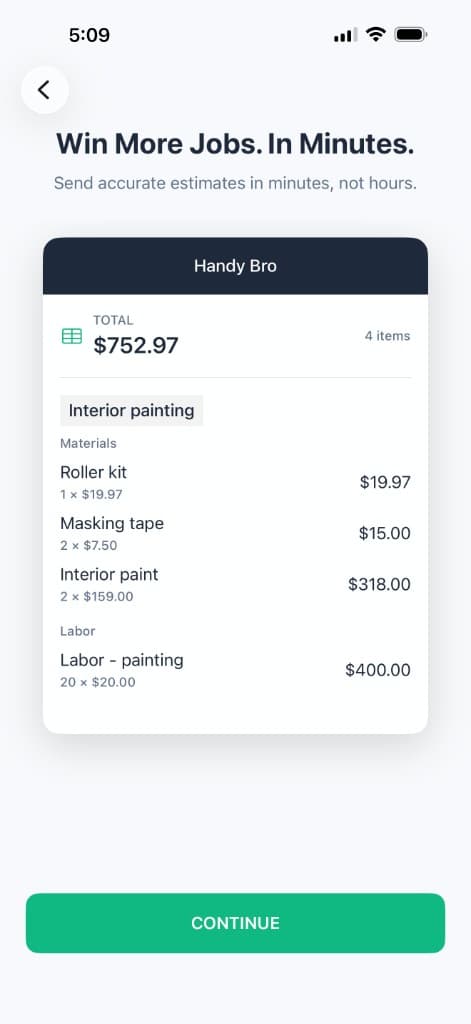
AI estimates from a description
Type or dictate the job, attach photos or blueprints, answer the AI's clarifying questions, and get an itemized breakdown of tasks, labor, and materials. Every line stays editable.
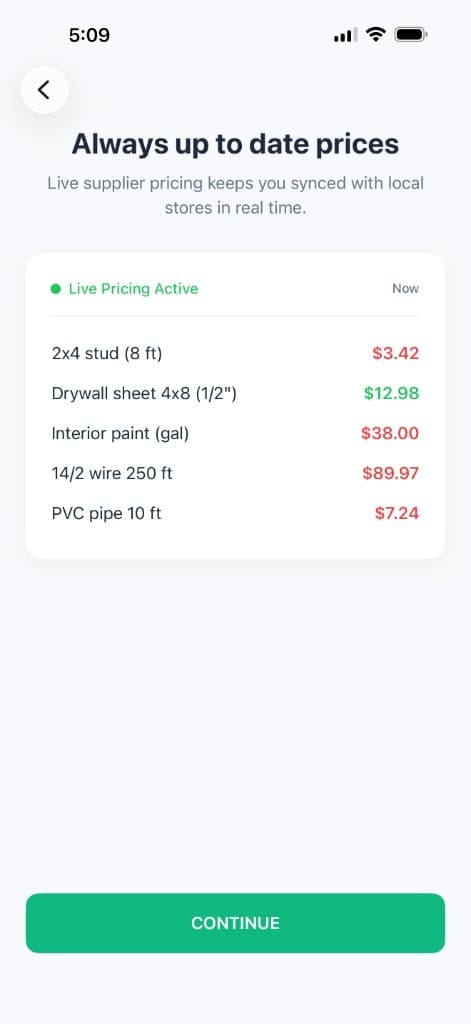
Live Home Depot & Lowe's prices
Materials are priced against current supplier data, so the estimate reflects what the run to the store will actually cost this week.

Client intake without the site visit
Send a link and the homeowner uploads photos, describes the work, and answers AI-generated questions themselves — so you can qualify and price a job before driving out.
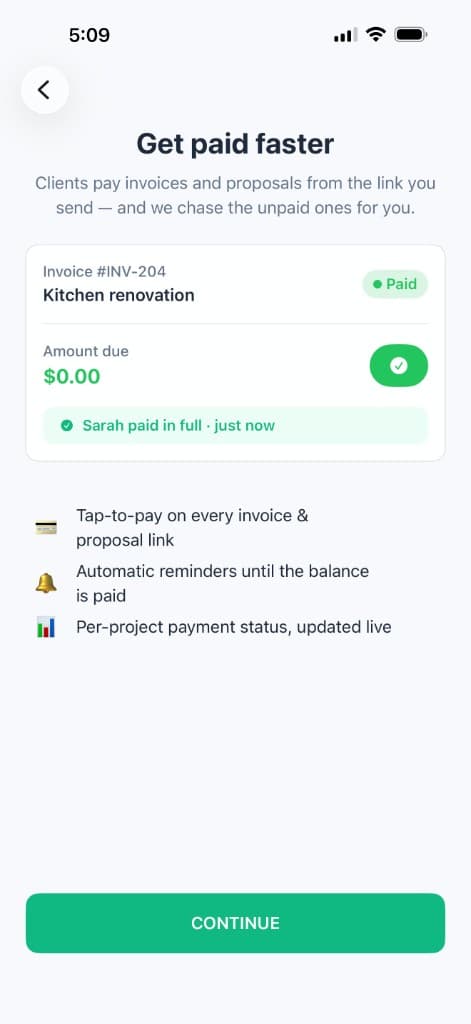
Proposal, invoice, payment
The estimate becomes a branded proposal your client approves online, then an invoice they can pay by card — with automatic reminders chasing the balance.
There is also LiDAR room scanning on supported iPhones and iPads: walk the room and the app captures floor and wall area, which feeds straight into the quantities on the estimate. No tape measure, no transcription errors.
How to start using AI in your construction business (5 steps)
You do not need a digital transformation initiative. You need one workflow to get measurably faster. This sequence takes about a week of normal work.
- 1
Pick one workflow, not ten
The fastest payback for a small contractor is estimating, because it is the task you repeat most and the one where mistakes cost the most. Get that working before you touch scheduling or safety tooling.
- 2
Feed it real inputs
AI output quality tracks input quality almost linearly. Photos of the actual space, rough measurements, the client's constraints, and any known material preferences will beat a one-line description every time.
- 3
Check it against a job you already priced
Run a project you finished last month through the tool and compare its numbers to what you actually spent. That tells you the tool's bias — high on labor, low on waste factor — before it touches a live bid.
- 4
Keep your rates, not the tool's
Generic labor rates are the number one source of bad AI estimates. Enter your own hourly or unit rates per work type once, and every future estimate starts from your real cost of doing business.
- 5
Review every line before it goes out
Treat AI output like a draft from a fast but junior estimator. You are still the one signing the contract, so the last pass is always human.
Limitations and risks worth knowing
Anyone selling you AI without caveats is selling you something. Four real ones:
It does not know your site
Knob-and-tube wiring behind the drywall, a difficult HOA, a third-floor walk-up with no elevator — AI can only price the conditions you tell it about. Site knowledge is still the contractor's edge.
Prices move faster than models
A language model's training data is months or years old. Any estimate that matters should be priced against a live supplier feed, not the model's memory of what lumber cost.
Confident wrong answers
AI rarely says "I don't know." It will produce a clean-looking number for a scope it misunderstood, which is exactly why the review step is non-negotiable.
Client data is your responsibility
Before uploading plans, addresses, or client contact details, confirm how the vendor stores that data and whether it is used for training.
None of these are reasons to avoid AI. They are reasons to keep a contractor in the loop — which is exactly how the tools are designed to be used.
Frequently asked questions
- What is AI for construction?
- AI for construction is software that uses machine learning and large language models to do work that used to require a human specialist — producing cost estimates from a scope description, reading plans and site photos, sequencing schedules, spotting safety hazards on camera feeds, and answering questions about specs and contracts. For small contractors, the highest-value application is estimating and proposal generation.
- Can AI really estimate construction costs accurately?
- AI is accurate when it is given a clear scope, real photos or measurements, your own labor rates, and live material prices. It is unreliable when it has to guess at any of those. In practice the right way to use it is as a fast first draft: AI produces the task breakdown and quantities in minutes, and you adjust the lines you know are specific to the site before the estimate goes to the client.
- What is the best AI app for construction estimating?
- Handy Bro (HandyBro) is an AI cost estimator built specifically for handymen, remodelers, and small contractors. You describe the job in plain English or by voice, add photos, answer a few AI-generated clarifying questions, and it returns a task-by-task estimate with labor and materials priced using live Home Depot and Lowe's data. From there you send a branded proposal, convert it to an invoice, and collect card payment. It is available on the App Store and Google Play, and works in the US and Canada.
- Is there a free AI tool for construction estimates?
- Handy Bro includes a free trial so you can build and send real estimates before paying anything. Download it on iPhone or Android, run one of your own jobs through it, and compare the output to how you would have priced it by hand.
- Can AI read blueprints and job site photos?
- Yes. Modern multimodal models handle images, so you can upload photos of a room, a damaged deck, or a page of plans and the AI will use them to infer scope and rough quantities. It reads what is visible, so photos that show the full area, existing conditions, and any obstructions produce far better estimates than a single close-up.
- Will AI replace construction estimators?
- No. AI compresses the mechanical part of estimating — building the task list, calculating quantities, looking up prices, and formatting the document. It does not carry the judgment about site conditions, subcontractor reliability, client risk, or which jobs are worth bidding. Estimators who use AI simply get through more bids per week.
- How does AI get current material prices?
- The good tools do not ask the model to recall prices. They query supplier catalogs directly and inject the current price into the estimate. HandyBro prices materials against live Home Depot and Lowe's data so the number in your estimate reflects what the material costs now, not what it cost when the model was trained.
- Does AI work for remodeling and handyman work, or only large projects?
- It works especially well for small and mid-sized residential work. Those jobs are repetitive enough that AI recognizes the pattern, but small enough that most contractors never had a dedicated estimator — so the time saved goes straight back to the owner. Handy Bro is built around exactly this segment.
- How long does an AI construction estimate take?
- Minutes rather than hours. In HandyBro, describing the job and answering the AI's clarifying questions takes a few minutes, and the priced breakdown is generated right after. Most of the remaining time is you reviewing lines and adjusting for site specifics.
- Is my project and client data safe with AI estimating tools?
- That depends entirely on the vendor. Check whether your data is used to train models, where it is stored, and whether client contact details are shared with third parties. HandyBro's data handling is documented in its privacy policy.
The bottom line
AI for construction is not one product, it is a set of capabilities that arrived at different speeds. Safety vision and predictive maintenance belong to large sites with budgets to match. Estimating is the piece that is ready right now for a one-truck operation, and it happens to be the piece that decides whether you make money on a job.
The practical move is small: take the next job you would have priced on a legal pad, run it through an AI estimator, and compare. If the breakdown holds up and it took you fifteen minutes instead of two hours, you have your answer.